
README.md (8597B)
BHCLI
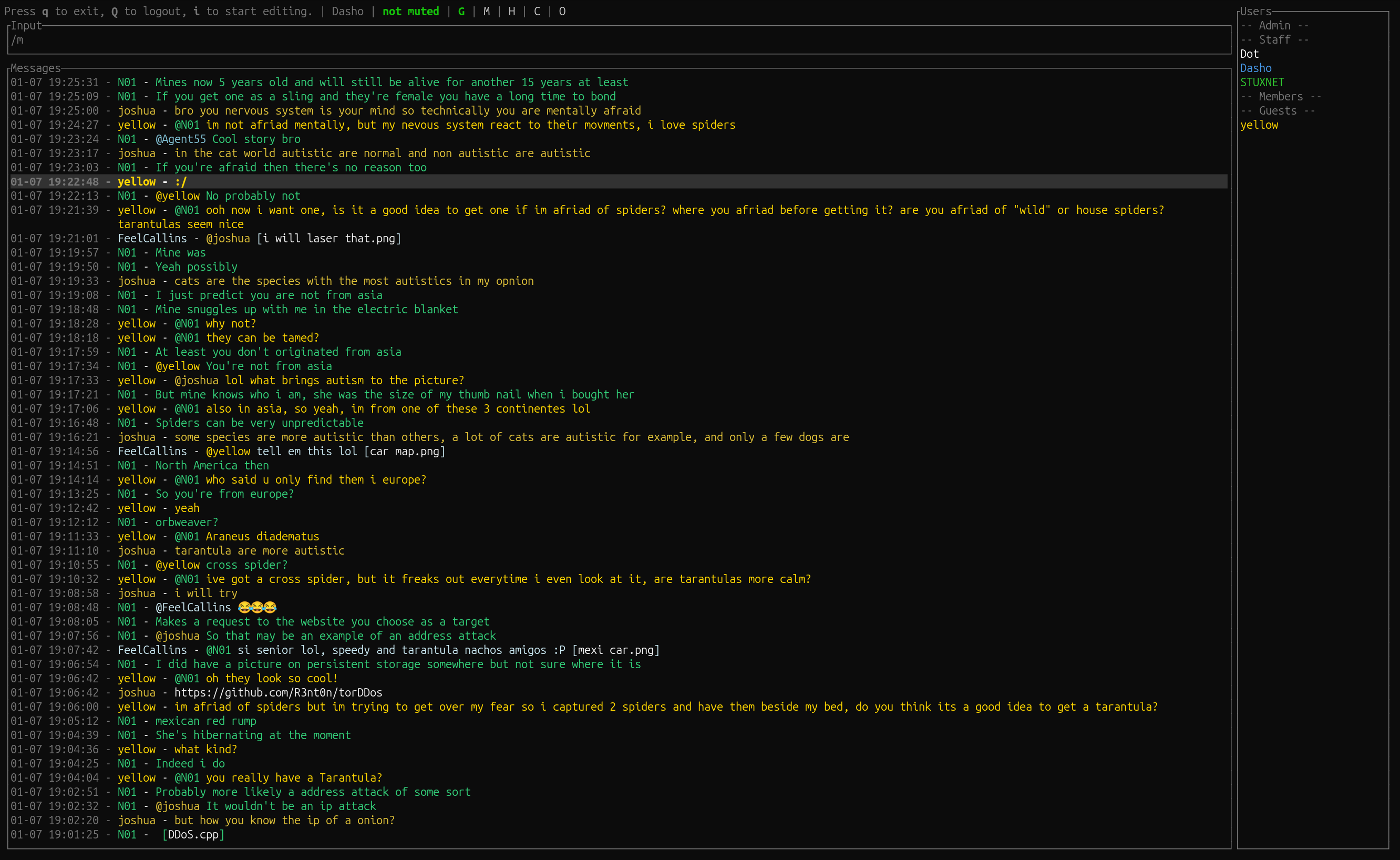
A sophisticated terminal client for le-chat-php based chat systems. Built for the darknet, optimized for Tor, works everywhere.
What is this?
BHCLI is a CLI chat client designed for anonymous communication over Tor. It connects to any le-chat-php chat server with full feature parity plus advanced capabilities like AI integration, bot automation, and developer tools.
Officially supported:
Getting Started
Quick Install
Pre-built binaries:
# Download from latest release
https://github.com/d-a-s-h-o/bhcli/releases/latest
Build from source:
# Install Rust if you don't have it
curl --proto '=https' --tlsv1.2 -sSf https://sh.rustup.rs | sh

# Clone and build
git clone <repo>
cd bhcli
cargo build --release

# Binary will be at target/release/bhcli
Linux dependencies:
apt-get install -y pkg-config libasound2-dev libssl-dev cmake libfreetype6-dev libexpat1-dev libxcb-composite0-dev libx11-dev
First Run
# Just run it, it will prompt you
./bhcli

# Or specify credentials
./bhcli -u yourusername -p yourpassword

# Through Tor (default)
./bhcli -s socks5h://127.0.0.1:9050

# Direct connection (not recommended for darknet chats)
./bhcli --no-proxy
On first run, a man page gets installed automatically. Access it with man bhcli anytime.
Core Features
The Basics
- Private messaging with
/pm username message - Sound notifications when tagged or PM'd (can be disabled with
m) - File uploads with
/u /path/to/file.png @username optional message - Captcha rendering directly in terminal at 10x size
- Tab completion for usernames
- Message history with up/down arrows
- Copy to clipboard with
ctrl+cory
Views and Filters
Toggle between different chat views:
shift+Gfor guest view (filter out members chat and PMs)shift+Mfor members view (filter out guest chat and PMs)/f termsto filter messages by content/ignore usernameto hide someone's messagesbackspaceto hide individual messages,ctrl+Hto view hidden ones
Message Navigation
j / down arrow    Move down one message
k / up arrow      Move up one message
J (shift)         Jump down 5 messages
K (shift)         Jump up 5 messages
gg               Jump to top
ctrl+d           Page down
ctrl+u           Page up
Quick Actions
t                Tag author of selected message (@username)
p                Start PM to author (/pm username)
y                Copy selected message
shift+Y          Copy first link in message
d                Download embedded file
D                Download and open file
Power Features
ChatOps Commands (30+ tools)
BHCLI includes a full developer toolbox accessible via slash commands:
/help                    List all ChatOps commands
/man curl               System manual pages
/doc rust HashMap       Language documentation
/hash sha256 text       Cryptographic hashing
/uuid                   Generate UUIDs
/base64 encode data     Encoding utilities
/github user/repo       Repository info
/ping google.com        Network diagnostics
/translate spanish Hi   AI translation
See MANUAL.md or man bhcli for the complete command reference.
AI Integration
When OPENAI_API_KEY is set:
- Real-time translation across 100+ languages
- Sentiment analysis of conversations
- Code review and debugging assistance
- Chat summarization and insights
- Smart moderation (configurable strictness)
Control AI features:
/ai off              Disable AI completely
/ai mod              Moderation only
/ai reply all        Reply to all messages
/ai reply ping       Reply when mentioned
/ai strict           Strict moderation
/ai balanced         Balanced moderation (default)
/ai lenient          Lenient moderation
Background Bot System
Run a persistent bot alongside your client:
./bhcli --bot BotName --bot-admins alice,bob
Bots provide:
- Perfect memory of all chat history
- Message search and recall
- User statistics and analytics
- Data export capabilities
- Message restoration for deleted content
Interact with bots by mentioning them:
@BotName help
@BotName stats alice
@BotName search "rust error"
@BotName recall 14:30
@BotName export alice 7
Configuration
Profiles
Store credentials in ~/.config/bhcli/bhcli.toml:
[profiles]

[profiles.default]
username = "yourusername"
password = "yourpassword"

[profiles.work]
username = "workaccount"
password = "differentpassword"
Switch profiles with bhcli -c work
Custom Commands
Create personal shortcuts:
[commands]
hello = "hey everyone, how's it going?"
afk = "stepping away for a bit, ping me if needed"
rules = "1. Be cool 2. No spam 3. Stay anonymous"
Use them by typing !hello, !afk, etc.
Environment Variables
export BHC_USERNAME="myuser"
export BHC_PASSWORD="mypass"
export BHC_PROXY_URL="socks5h://127.0.0.1:9050"
export OPENAI_API_KEY="sk-..."  # For AI features
Advanced Usage
Editing Mode
The input bar supports Vim-like editing:
ctrl+a           Start of line
ctrl+e           End of line
ctrl+f           Word forward
ctrl+b           Word backward
ctrl+l           Toggle multiline mode
ctrl+.           Open external editor (nvim/vim/nano)
In multiline mode, enter adds newlines, ctrl+enter sends.
Moderation Tools (Members+)
For moderators and admins:
/kick username reason       Boot someone
/ban username              Ban user (fuzzy match)
/ban "exact username"      Ban exact match
/filter spamtext           Auto-filter messages
/banlist                   Show banned users
/filterlist                Show filtered terms
/unban username            Remove ban
/unfilter text             Remove filter
Quick keyboard shortcuts:
ctrl+k           Prefill kick command for selected message
ctrl+b           Prefill ban command
ctrl+a           Prefill members group message
ctrl+w           Send warning message
Multiple Accounts (Members+)
Link alt and master accounts for delegation:
/set alt AltAccountName
/set master MasterAccountName
This enables command forwarding and cross-account operations.
Building and Distribution
Standard Build
make build          # Debug build
make release        # Optimized release
make test           # Run tests
make check          # Quick compile check
Cross-Platform
make build-linux-musl      # Static Linux binary
make build-macos           # macOS binary
make build-windows         # Windows binary
make build-all             # All platforms
Optional Features
# Build without audio (for headless servers)
make build-no-audio

# Or with cargo directly
cargo build --release --no-default-features
Documentation
MANUAL.mdfor detailed guides and full command referenceman bhclifor quick terminal reference (installed on first run)OPTIMIZATION_REPORT.mdfor technical details and performance info
Performance Notes
BHCLI is optimized for low resource usage:
- 500ms tick rate keeps CPU usage minimal
- Optional audio works on headless systems
- Lazy loading defers expensive operations
- LTO and strip produces compact binaries (~28MB release)
No fan spin-up, no excessive polling, just efficient terminal communication.
Contributing
Built with Rust 2021 edition. Clean codebase, zero compiler warnings, comprehensive error handling. Pull requests welcome.
Development:
make fmt            # Format code
make clippy         # Run linter
make check          # Fast compilation check
cargo doc --open    # Generate and view docs
Security Notes
BHCLI is designed for anonymous communication:
- Tor-first architecture with SOCKS5 support
- No telemetry or external phone-home
- Local storage only (config and bot data)
- Optional features minimize attack surface
For darknet usage, always route through Tor. Never use --no-proxy with .onion addresses unless you know what you're doing.
License
MIT
See LICENSE.md file for details.